E-Challan Online: Check Status, Pay Traffic Fine & Dispute Wrong Challan (2026 Guide)
You checked your phone and there it was — a government SMS about a traffic challan you had no idea existed. No police stop, no roadside drama. Just a fine, silently sitting against your vehicle number on a server somewhere.
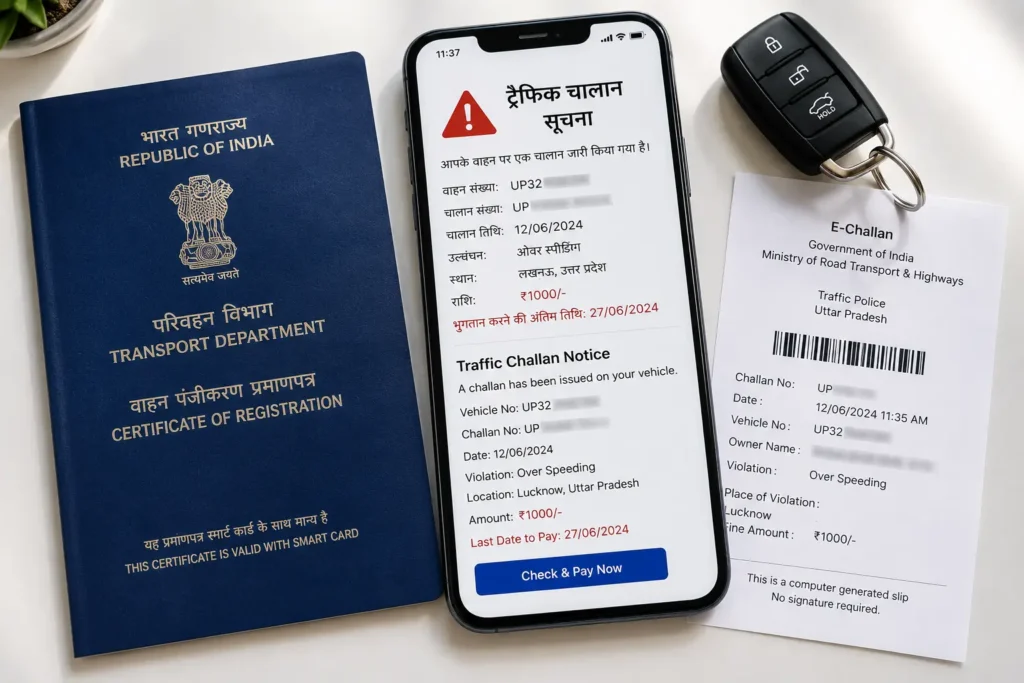
That’s exactly how India’s e-challan system works now. Whether it’s a red-light camera catching your plate at 2am or a traffic officer tapping your RC into a handheld device, the fine lands digitally — linked to your vehicle, your licence, your RC renewal, your car sale. There’s no losing the slip. No pretending it didn’t happen.
This guide covers everything: how to check your e-challan online by vehicle number, pay it on the Sarathi Parivahan Sewa portal in minutes, spot fake challan scams, and dispute a wrong fine — without stepping into a police station or court.
Quick eChallan Online Check & Status
Check your traffic challan status online using your vehicle number, challan number, or driving licence details. View challan information, payment status, and safely continue to the official government portal for verification and payment.
What Exactly Is an E-Challan — and Why Does It Show Up Without Warning?
Most people discover their e-challan not at the roadside, but quietly — an SMS at midnight, a notification from an insurance app, or a rude surprise when they go to renew their RC (Registration Certificate). That’s the nature of digital enforcement. You don’t have to be stopped by traffic police anymore for a challan to exist against your vehicle.
An e-challan (electronic challan) is a digitally issued traffic fine generated under India’s Motor Vehicles (Amendment) Act, 2019. Instead of a handwritten slip, the fine is created electronically — either by a traffic officer using a handheld device, or automatically by a roadside CCTV or ANPR (Automatic Number Plate Recognition) camera. The moment the system captures a violation, it links the fine directly to your vehicle registration number and stores it on the central Parivahan server.
What makes this different from the old paper system is enforcement traceability. Your challan follows your vehicle’s RC number everywhere — from RC renewal to vehicle sale to fitness certificate applications. Ignoring it isn’t really an option anymore.
How the E-Challan System Works in India
Traffic enforcement in India now runs on two parallel tracks: officer-issued challans (via smartphone app or handheld PoS device) and camera-generated challans (via fixed CCTV, ANPR speed cameras, or red-light cameras). Both feed into the same central database at echallan.parivahan.gov.in, operated under the Ministry of Road Transport and Highways (MoRTH).
When a violation is recorded:
- The vehicle number is matched against the VAHAN database (India’s national vehicle registry)
- The registered owner receives an SMS with a challan number and fine details
- The e-challan online record appears on the Parivahan portal within 24–72 hours (sometimes longer for camera-generated challans)
- A payment window of typically 60 days begins
If the SMS doesn’t arrive — it happens when wrong mobile numbers are recorded at the RTO — the challan still exists. That’s why checking your vehicle number on the portal periodically is smart practice, especially before selling a car or approaching any loan process. You can also view your vehicle’s complete registration details anytime via the RTO Vehicle Information section on this site.
How to Check E-Challan Status Online — Step by Step
Official portal: echallan.parivahan.gov.in
You can check using any one of three details: your vehicle registration number, your challan number (if you received the SMS), or your driving licence number.
Step 1: Go to echallan.parivahan.gov.in and click on “Check Challan Status” from the menu.
Step 2: Select what you want to search by — Vehicle Number, Challan Number, or DL Number.
Step 3: Enter the number carefully. For vehicle numbers, use the correct format (e.g., DL01AB1234, MH12XY5678). Avoid spaces.
Step 4: Complete the captcha verification and click “Get Detail”.
Step 5: Your pending and cleared challans will appear, along with violation type, date, fine amount, and (for camera-generated challans) photo or video evidence.
Step 6: If you want to pay, click “Pay Now” and you’ll be directed to the payment section.
Tip: If a challan doesn’t appear after 3 days of a reported incident, check again after a week. Camera-based challans sometimes take longer to sync between state traffic servers and the central Parivahan database.
How to Pay E-Challan Online — The Complete Process
Paying your e-challan online takes under 5 minutes once your challan is located. Here’s exactly how it works on the official Parivahan portal:
Step 1: Visit echallan.parivahan.gov.in/index/accused-challan
Step 2: Enter your Vehicle Number, Challan Number, or DL Number.
Step 3: Fill in the captcha and click “Get Detail.”
Step 4: Review the challan details. Check the violation type, date, location, and fine amount. If there’s photo evidence attached, verify it’s your vehicle.
Step 5: Click “Pay Now” on the challan you want to clear.
Step 6: Choose your payment method — UPI, Debit/Credit Card, or Net Banking.
Step 7: Complete the transaction and save the Transaction ID. Download the receipt immediately.
Accepted payment methods: UPI (Google Pay, PhonePe, Paytm), Debit/Credit Card, Net Banking. Google Pay users can also pay directly within the app via Pay Bills → Traffic Challans.
After payment: Status usually updates within 2–7 days on the portal. If it still shows “Pending” after 7 days, use the “Check Failed Transaction” option on the portal or raise a grievance.
State-Wise E-Challan Payment Portals
While the central Parivahan portal covers most states, some states have their own dedicated portals that sometimes update faster:
| State | Portal |
| Delhi | trafficpolice.delhipolice.gov.in |
| Maharashtra | mahatrafficportal.mahait.org |
| Karnataka | karnatakaone.gov.in |
| Uttar Pradesh | uppolice.gov.in → Check Challan |
| Tamil Nadu | tnechallan.parivahan.gov.in |
| Telangana | tschallan.tspolice.gov.in |
| West Bengal | echallan.parivahan.gov.in (central) |
If the e-challan online portal doesn’t show a challan you know was issued — especially in Delhi, Maharashtra, or Karnataka — check the state portal directly. State databases sometimes push data to the central server with a delay.
Traffic Fine Amounts in India (Updated 2026)
In March 2026, several fine amounts were revised upward. Here’s a current snapshot of common violations under the Motor Vehicles Act 2019:
| Violation | Fine Amount |
| Driving without valid licence | ₹5,000 |
| Drunk driving (first offence) | ₹10,000 + possible 6 months imprisonment |
| Drunk driving (repeat offence) | ₹15,000 + up to 2 years imprisonment |
| Mobile phone use while driving | ₹5,000 |
| No helmet (two-wheeler) | ₹1,000 + 3-month licence suspension |
| No seatbelt | ₹1,000 |
| Overspeeding (LMV) | ₹1,000–₹2,000 |
| Overspeeding (medium/heavy vehicle) | ₹2,000–₹4,000 |
| Signal jumping | ₹500–₹1,000 (varies by state) |
| Driving without insurance | ₹2,000 (first offence) |
| Driving without valid RC | ₹2,000–₹5,000 |
| No PUC certificate | ₹10,000 |
| Racing/dangerous driving | ₹5,000 |
| Child not wearing helmet/harness (under 4 years) | ₹2,000 |
| Parking in no-parking zone (metro areas) | Up to ₹5,000 |
Note: Repeat violations within 12 months can attract double the original fine. State-specific rules may also apply on top of central fine amounts.
What Happens If You Don’t Pay the E-Challan?
This is the part most people don’t fully understand — and it’s where ignoring a challan becomes genuinely costly.
If the challan goes unpaid past the standard window (usually 60–90 days), it escalates in a specific sequence:
1. Transfer to Virtual Court: The challan is automatically forwarded to India’s Virtual Court system (vcourts.gov.in), where you’ll receive a summons electronically. You can still pay online or choose to contest.
2. Court Summons: If the virtual court challan is also ignored, the case may get transferred to a physical traffic court, resulting in a summons to appear in person.
3. Service Blocks: Several states now block RTO services for vehicles with pending challans — this includes RC renewal, RC transfer (critical when selling your vehicle), fitness certificate renewal, and permit applications.
4. Licence Suspension: Under Section 86 of the Motor Vehicles Act, repeated or unresolved challans can lead to licence suspension.
5. Insurance Impact: Multiple unpaid challans on record can mark you as a high-risk driver with insurers, leading to higher premium quotes at renewal.
The practical reality: Delhi data shows that over 94% of challans issued in one recent year went unpaid. But enforcement is tightening — especially as ANPR integration expands across states and inter-state data sharing improves under the ONOC (One Nation One Challan) framework.
How to Dispute a Wrong E-Challan
Not every e-challan online record is accurate. ANPR cameras misread plates. Vehicles get captured in wrong locations. Challans sometimes get issued to old owners after an RC transfer hasn’t fully updated in the system. If your challan looks wrong, you have clear legal options.
Valid grounds for disputing:
- Vehicle wasn’t at the listed location at the given time
- Number plate was misread (similar-looking characters — 0 vs O, 1 vs I, 8 vs B)
- You had already sold the vehicle and RC transfer wasn’t updated
- The same violation was charged twice
- Wrong vehicle type or colour is mentioned
- You were physically stopped but the details are inaccurate
Route 1: Online Dispute via Parivahan Grievance
Go to echallan.parivahan.gov.in → click “Complaint” → fill the complaint form with your challan number and issue description → upload your challan photo or any supporting document → submit and note the reference number.
Route 2: Virtual Court Contest at vcourts.gov.in
Once a challan appears in the Virtual Court system:
- Visit vcourts.gov.in and search by Vehicle Number or Challan Number
- Click “View” on your case
- Select “I wish to contest the case”
- Verify via OTP
- Submit your contest request — you’ll receive an acknowledgement with the court name and hearing date
The hearing is conducted digitally. In proven cases (clear evidence of misread plates, GPS records showing different location, etc.), reversals typically happen within 21–60 days.
Route 3: Lok Adalat for Fine Reduction
If you don’t want to fully dispute but feel the amount is excessive, Lok Adalats offer an alternative. These are periodic dispute resolution forums run by NALSA (National Legal Services Authority). You can register your case, attend on the specified date, and a magistrate may reduce the fine — sometimes by 30–70%. The decision is final and binding, but the process is free and significantly faster than regular courts.
Check upcoming Lok Adalat dates at nalsa.gov.in.
What to keep ready before disputing:
- Challan number and vehicle number
- Photo/video evidence (dashcam footage if available)
- GPS records or toll receipts showing vehicle location at the time
- RC copy and any ownership transfer documents
- DigiLocker documents for current vehicle status
E-Challan Scams — How to Spot and Avoid Them
With e-challan online payment now mainstream, scammers have moved in. The most common pattern: a fake SMS arrives claiming a traffic challan is pending, with a UPI ID or link to “pay ₹500 immediately to avoid legal action.” This is not how the government operates.
Official government e-challans:
- Come from government SMS headers (e.g., TPECHL, ECHLLN, MoRTH)
- Direct you to echallan.parivahan.gov.in — not a random URL or shortened link
- Never ask for payment via a personal UPI ID or WhatsApp
- Never threaten “immediate arrest” in 24 hours
If you receive a suspicious challan SMS:
- Do NOT click any link in the message
- Open your browser and manually type echallan.parivahan.gov.in
- Search your vehicle number — if no challan exists, the SMS is fake
- Report the scam at cybercrime.gov.in
Some transport departments do send legitimate WhatsApp reminders — but always verify by checking the official portal independently before making any payment.
Checking E-Challan via Mobile Apps
Apart from the official portal, several trusted apps let you check and pay challans:
mParivahan App (Government App): The official mobile app from MoRTH. Lets you check RC details, DL status, and challan status. Also stores digital copies of your RC and DL, which are legally valid on Indian roads.
DigiLocker: Stores your vehicle documents and can be used for DL and RC verification. Some states integrate challan alerts within DigiLocker-linked services.
Google Pay: Pay challans directly via Pay Bills → Traffic Challans. One challan at a time. Note: there may be a small convenience fee for card payments, and the issuer sometimes adds a digital collection surcharge. Payments that fail are automatically refunded.
CarInfo, Park+, Spinny, ACKO (Third-party apps): These aggregate data from official portals and offer challan check with your vehicle number. Useful for quick checks, but always confirm that the payment gateway routes to the official Parivahan portal and you receive a government receipt — not just a third-party acknowledgement.
Before You Sell Your Car: Why Challan History Matters
This is something many vehicle sellers overlook. Pending challans are linked to the RC, not just the owner. If you sell a vehicle with unpaid challans:
- The buyer may face problems during RC transfer
- In some states, RC transfer is blocked until all challans are cleared
- The new owner could theoretically be served notices for violations committed under the previous owner (particularly for challans where camera footage shows an old date)
- Insurance claims on the vehicle can be complicated by outstanding traffic fines in some cases
Before listing your vehicle, check its e-challan online status and clear anything pending. It removes a real friction point from the sale — and protects both parties.
Common Problems and Their Solutions
Problem: Payment shows “Pending” even after transaction completed
Wait 2–3 days. If still showing pending after 7 days, use the “Check Failed Transaction” tool on the Parivahan portal. If money was debited, visit echallan.parivahan.gov.in → Grievance → enter your transaction details. Keep your bank debit confirmation as proof.
Problem: Challan not showing on Parivahan portal
New camera-based challans can take 3–7 days to sync. Also verify you’re entering the vehicle number in the correct format (no spaces, capital letters, e.g., UP32CX1234). If a challan was issued in a specific state, try that state’s portal as well.
Problem: Challan showing wrong vehicle details
Raise a complaint immediately via the Parivahan Grievance portal with documentary proof. Don’t pay a challan that has incorrect details — paying it could be construed as accepting guilt for a violation that wasn’t yours.
Problem: Mobile number is wrong, can’t receive OTP
For virtual court proceedings, you can choose verification via engine and chassis number instead of OTP if your registered mobile number in the challan is incorrect.
Problem: Challan paid but still showing in pending at RTO during RC renewal
This usually means the payment hasn’t synced with the state RTO database yet. Carry your payment receipt and transaction ID to the RTO — in most cases, this resolves the issue on the spot.
FAQs About E-Challan Online
Final Thoughts
An e-challan online isn’t just a fine — it’s a digital record attached to your vehicle that follows you through RC renewals, car sales, and insurance assessments. The good news is that the system has made resolution genuinely simple. Check your status on echallan.parivahan.gov.in, pay within the deadline, and always save that transaction ID.
If something looks wrong, the Virtual Court and Parivahan Grievance portal give you a legitimate path to contest it — no lawyer needed for most straightforward cases.
Drive clean, keep your documents valid, and check your challan status before life forces you to do it in a hurry.