RTO Vehicle Information Online – Check RC, Challan & Driving Licence Details Easily Online by Number in India
In India, RTO Vehicle Information helps you know complete details of any vehicle registered with the Regional Transport Office (RTO). Whether you are buying a second-hand bike, checking your own car details, or verifying challan and registration status, online RTO vehicle information services make the process fast, easy, and transparent.
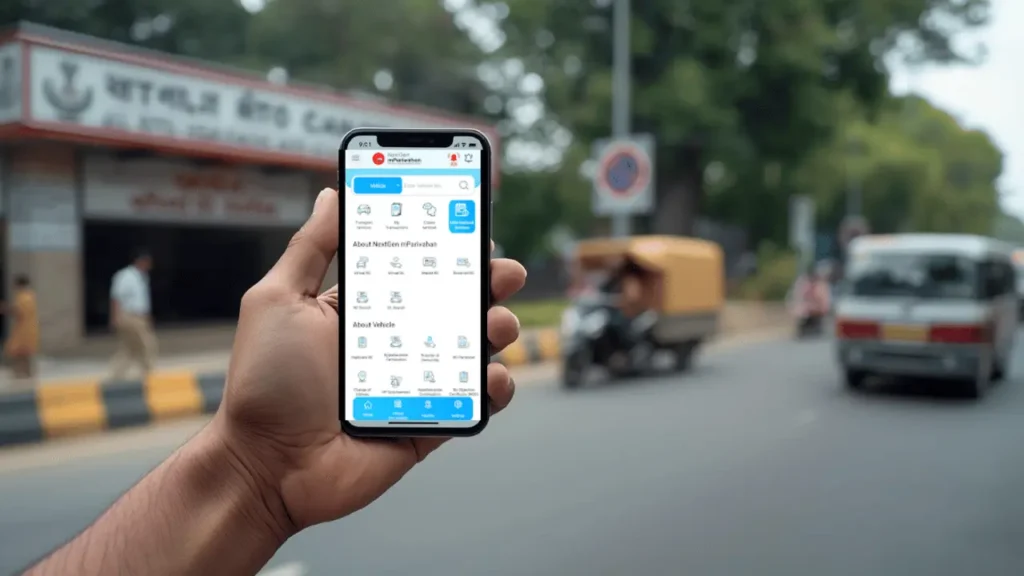
With digital platforms like VAHAN portal under Parivahan Sewa and the mParivahan app, you can now check vehicle information online by number without visiting the RTO office.
What Is RTO Vehicle Information?
RTO Vehicle Information means official data related to a vehicle that is registered under an RTO in India. This information is maintained by the Ministry of Road Transport and Highways (MoRTH) and includes registration, ownership, insurance, and other legal details.
People often search for:
- vehicle information RTO
- rto information vehicle
- vehicle rto information
All these mean the same thing: checking official vehicle records online.
What Details Are Included in RTO Vehicle Information?
When you check RTO vehicle information online, you can see details such as:
- Vehicle Registration Number
- Owner Name (partially masked)
- Vehicle Type (Car / Bike)
- Fuel Type
- Registration Date & Validity
- RTO Office Name & Code
- Insurance Validity
- Fitness Certificate Status
- PUC Status
- Hypothecation (Loan) Details
This data is very helpful before buying a used vehicle or checking your own records.
How to Check RTO Vehicle Information on the VAHAN Portal (Official Website)
The VAHAN portal is the official government website that allows users to check RTO vehicle information online using the vehicle registration number. This method works for all Indian states and is completely free.
This is the most trusted way to check RTO vehicle information by number.
Step-by-Step Guide:
Step 1: Open the Official VAHAN Website
Visit the official Parivahan Sewa (VAHAN) website using any browser on your mobile or computer.
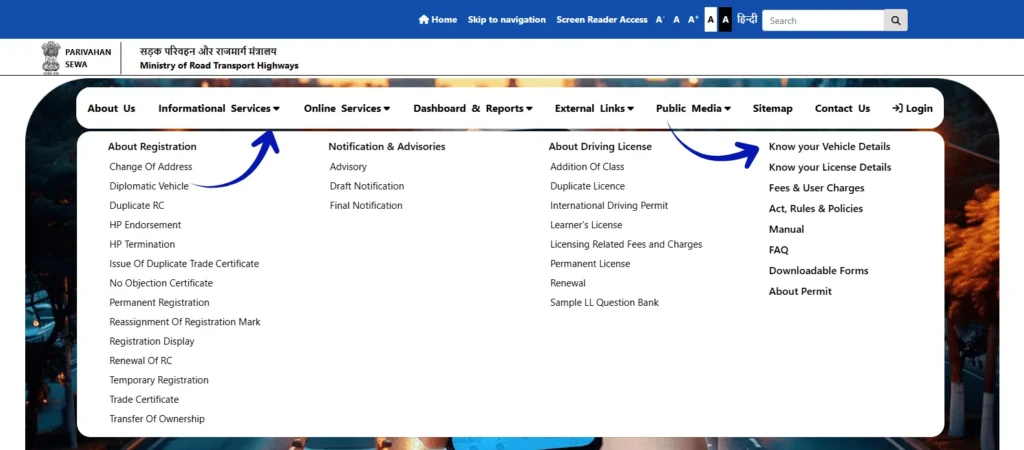
Step 2: Go to “Know Your Vehicle Details
On the homepage, look for the “Informational Services” section and click on “Know Your Vehicle Details.”
Step 3: Login or Register (If Required)
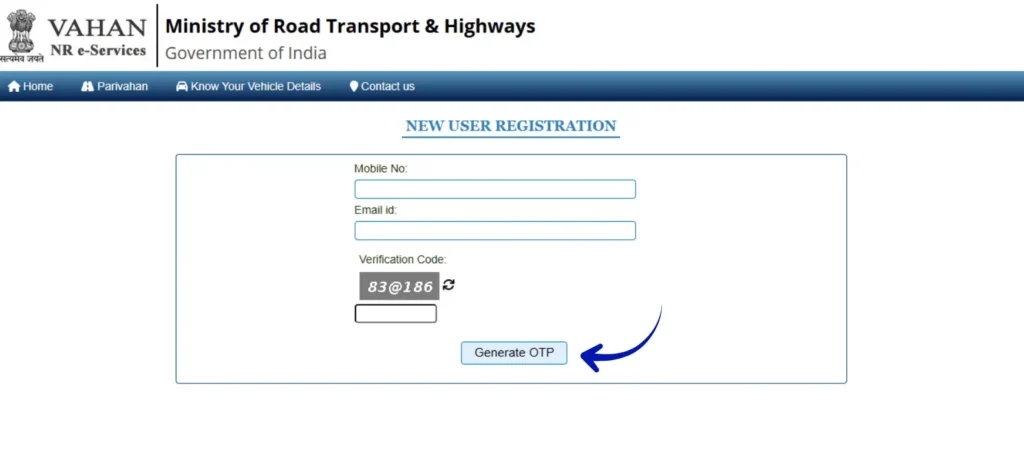
You may be asked to log in using your mobile number and email ID.
New users can quickly register by verifying an OTP.
Step 4: Enter Vehicle Registration Number
Now, enter your vehicle registration number in the correct format (for example: MH12AB1234) and fill in the captcha code.
Step 5: Search and View Vehicle Information
Click on the “Search” button.
Within seconds, you will see complete RTO vehicle information, including:
- Vehicle make and model
- Registration date and validity
- Owner name (partially masked)
- Insurance and fitness status
This method works across all Indian states. Whether you are searching for RTO vehicle information in Uttar Pradesh (UP), Maharashtra (MH), Madhya Pradesh (MP), Delhi, Gujarat, Rajasthan, Tamil Nadu, Karnataka, or West Bengal, the VAHAN portal provides accurate and official vehicle details from one trusted government platform.
How to Check RTO Vehicle Information Using the mParivahan App
The mParivahan app is an official mobile application by the Government of India. It is the easiest way to check RTO vehicle information by number directly from your smartphone.
Step-by-Step Guide:
Step 1: Download the mParivahan App
Download the official mParivahan app from the Google Play Store (Android) or Apple App Store (iOS).
Step 2: Register or Login
Open the app and register using your mobile number.
Verify your number with the OTP to complete login.
Step 3: Select “RC Search” or “Vehicle Details”
From the home screen, tap on “RC Search” or “Vehicle Details.”
Step 4: Enter Vehicle Registration Number
Enter the vehicle registration number carefully in the given field.
Step 5: View Vehicle Information Instantly
Tap on Search, and the app will instantly show:
- Vehicle owner details (masked)
- RC status
- Insurance and challan details
- Fitness and PUC validity
The mParivahan app is especially useful for checking RTO vehicle information online, tracking bike RTO vehicle information, and viewing RTO vehicle challan information anytime from your mobile.
How to Check Your Driving Licence Details Online (Step-by-Step Guide)
Checking your driving licence details online in India is very simple. The Government of India provides official and secure platforms where you can verify your licence information without visiting the RTO office.
Method 1: Check Driving Licence Details on Sarathi Parivahan (Official Website)
Sarathi Parivahan is the official website for all driving licence services in India, managed by the Ministry of Road Transport and Highways (MoRTH).
Step-by-Step Process:
Step 1: Visit the Official Website
Open your browser and go to the official Sarathi Parivahan website: https://sarathi.parivahan.gov.in/
Step 2: Select Your State
On the homepage, choose the state from where your driving licence was issued. This helps the system show the correct RTO database.
Step 3: Open Driving Licence Services
After selecting the state, click on “Driving Licence Related Services” or “Know Your Licence Details” under the Online Services section.
Step 4: Enter Licence Details
Now enter your Driving Licence Number and Date of Birth in the given fields. Fill in the captcha code correctly.
Step 5: View Licence Information
Click on Submit. Within seconds, your driving licence details will appear on the screen, including:
- Licence holder name (partially masked)
- Licence issue and expiry date
- Approved vehicle categories (bike, car, etc.)
- Current licence status
- RTO office details
This method is 100% official, safe, and works for all Indian states.
Method 2: Check Driving Licence Details Using the mParivahan App
If you prefer mobile access, the mParivahan app is the easiest option.
Step-by-Step Process:
Step 1: Download the mParivahan App
Install the official mParivahan app from the Google Play Store or Apple App Store.
Step 2: Login with Mobile Number
Register using your mobile number and verify it with OTP.
Step 3: Select Driving Licence Option
From the app dashboard, tap on “Driving Licence” or “DL Search”.
Step 4: Enter Driving Licence Number
Type your driving licence number carefully.
Step 5: View Licence Details Instantly
The app will show your licence information such as validity, vehicle class, and licence status.
Why Checking Driving Licence Details Online Is Useful
- Saves time and avoids RTO visits
- Helps verify licence validity
- Useful during traffic checks
- Confirms legal driving status
- Trusted and government-approved
State-Wise RTO Vehicle Information Coverage
Online RTO vehicle information services are available across India. You can check details for almost every state.
Popular States Covered
- UP: rto vehicle information up, up rto vehicle information
- MP: mp rto vehicle information, mp-09 rto vehicle information, rto bhopal vehicle information, rto jabalpur vehicle information
- Maharashtra: mh rto vehicle information, maharashtra rto vehicle information
- Rajasthan: rto vehicle information rajasthan, rajasthan rto vehicle information
- Gujarat: rto vehicle information gujarat, rto gujarat vehicle information
- Bihar: rto vehicle information bihar, rto bihar vehicle information
- Punjab & Haryana: rto vehicle information punjab, haryana rto vehicle information, hr rto vehicle information
- Other States:
- rto vehicle information west bengal (WB)
- rto vehicle information assam
- rto vehicle information odisha
- rto vehicle information jharkhand
- rto vehicle information uttarakhand (UK)
- rto vehicle information andhra pradesh (AP)
- rto vehicle information telangana (TS)
All these states are officially supported through the VAHAN website and mParivahan mobile app, ensuring accurate and real-time vehicle details across India.
RTO Vehicle Registration Process in India (Step-by-Step Guide)
In India, vehicle registration at the RTO (Regional Transport Office) is mandatory for all new vehicles. Without registration, no vehicle is legally allowed to run on public roads.
Below is a clear and easy step-by-step process to understand how RTO vehicle registration works.
Step 1: Visit Your Nearest RTO
After purchasing a new vehicle, take it to the nearest RTO office for physical inspection.
An RTO officer will verify the vehicle’s chassis number, engine number, and basic details.
Step 2: Fill Form 20 (Application for Registration)
Fill Form 20, which is the official application form for vehicle registration.
You can get this form:
- From the RTO office, or
- Online from the Parivahan Sewa website
Step 3: Submit Required Documents
You need to submit the following documents for vehicle registration:
- Form 21 (Sale Certificate) – provided by the vehicle dealer
- Form 22 / 22A (Roadworthiness Certificate) – from the manufacturer
- Valid Vehicle Insurance Policy
- Proof of Address (Aadhaar, electricity bill, ration card, etc.)
- Proof of Identity (Aadhaar, PAN, Voter ID, Passport)
- Temporary Registration (if issued by dealer)
- Vehicle Invoice (original)
- Passport-size photographs
- PAN Card or Form 60/61
- Chassis & Engine Number Pencil Print
- Form 34 (only if vehicle is purchased on loan)
- Customs clearance documents (for imported vehicles)
Most dealers help customers submit these documents.
Step 4: Vehicle Inspection by RTO Officer
An RTO inspector physically checks:
- Chassis number
- Engine number
- Vehicle type and category
This ensures the vehicle details match official records.
Step 5: Pay Registration Fees & Road Tax
Pay the applicable:
- Registration fees
- Road tax
After payment, collect the official receipt.
Step 6: Data Verification & Approval
Your vehicle data is entered into the RTO system and verified.
After verification, the Assistant Regional Transport Officer (ARTO) approves the registration.
Step 7: Issue of Registration Certificate (RC)
Once approved, the Registration Certificate (RC) is issued:
- As a Smart Card, or
- Digitally through VAHAN / mParivahan
The RC is sent to your registered address or collected from the RTO.
Step 8: Get High-Security Registration Plate (HSRP)
Apply for a High-Security Registration Plate (HSRP) through:
- Your vehicle dealer, or
- Authorized RTO vendors
HSRP is compulsory in most states.
Important Points to Remember
- Temporary Registration is valid for a short time and must be converted to permanent RC
- Online services are available in many states for appointment booking
- Rules may vary by state, so always check your local RTO website
- Vehicle dealers usually handle most registration work
Important Considerations
- Data Privacy: Owner details are protected and partially masked
- Accuracy: Always cross-check vehicle information online
- State Differences: Procedures may slightly differ across states
Tip:
After registration, you can easily check your RC details online using the VAHAN portal or mParivahan app.
Bike RTO Vehicle Information
If you want to check bike RTO vehicle information, the process is the same.
You can verify:
- Bike owner details
- Registration validity
- Insurance and challan status
This is very useful when buying a second-hand motorcycle.
RTO Vehicle Challan Information
Many users also search for RTO vehicle challan information.
Using online services, you can:
- Check pending challans
- See fine amount
- Verify traffic violation history
This helps avoid legal trouble and extra fines.
Why RTO Vehicle Information Is Important
Checking vehicle information RTO is important because it helps you:
- Avoid fraud while buying used vehicles
- Confirm ownership and loan status
- Check insurance validity
- Verify registration details
- Stay legally safe on roads
Common Problems While Checking RTO Vehicle Information
Sometimes users face issues like:
- Vehicle details not showing
- Incorrect registration number
- Server error
Solution:
Double-check the number format and try again later or use the mParivahan app.
Tips Before Buying a Used Vehicle
Before finalizing a second-hand vehicle:
- Check RTO vehicle information by number
- Verify insurance and hypothecation
- Match RC details with seller documents
These small checks can save you from big losses.
FAQs – RTO Vehicle Information
Final Thought
Accessing RTO vehicle information has become easier than ever in India. With trusted platforms like VAHAN and mParivahan, anyone can quickly check vehicle details, challan status, or registration information using just a vehicle number. These digital services save time, reduce paperwork, and remove the need for unnecessary RTO visits.
Whether you want RTO vehicle information online, by number, or state-wise details, digital services make everything quick and reliable.
Always rely on official platforms for accurate information.